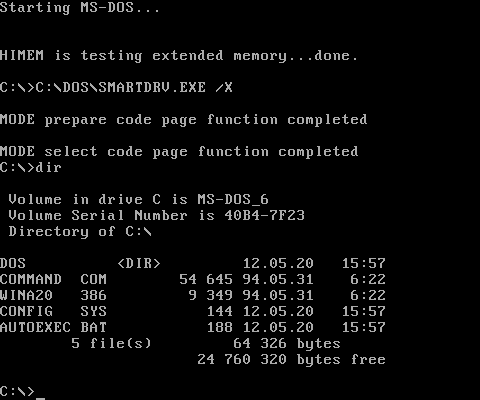
MS-DOS (Microsoft Disk Operating System) was a pivotal operating system in the history of personal computing, particularly in the IBM PC compatible market. It was the dominant operating system for PCs from the early 1980s until the mid-1990s when graphical user interfaces (GUIs) like Microsoft Windows began to fully take over.
Here’s a breakdown of what MS-DOS was all about:
What is MS-DOS?
- Command-Line Interface (CLI): At its core, MS-DOS was a text-based, command-line operating system. Users interacted with it by typing commands at a prompt (e.g.,
C:\>) rather than clicking icons with a mouse. - Single-User, Single-Tasking: It was designed for one user to run one program at a time. While some advanced memory managers allowed “swapping” between programs, true multitasking as we know it today was not native to DOS.
- Disk Operating System: Its name highlights its primary function: managing files and directories on disks (floppy disks and later hard drives).
Key Characteristics and Features:
- File System:
- Used the FAT (File Allocation Table) file system (FAT12, FAT16).
- 8.3 Filenames: Initially, files were limited to 8 characters for the name and 3 characters for the extension (e.g.,
MYFILE.TXT). Later versions introduced VFAT (Virtual FAT) for long filenames in conjunction with Windows 95. - Directory Structure: Supported hierarchical directory structures (folders within folders) introduced in version 2.0.
- Memory Management:
- 640KB Barrier: A famous limitation was that applications could directly access only the first 640 kilobytes of RAM (conventional memory). This was due to the original design of the IBM PC and its memory map.
- Upper Memory Blocks (UMBs): Memory between 640KB and 1MB was reserved for hardware and BIOS, but portions could be used for drivers and TSRs (Terminate and Stay Resident programs) via memory managers like EMM386.
- Expanded Memory (EMS) and Extended Memory (XMS): Technologies developed to access RAM beyond 1MB. EMS was a bank-switching method, while XMS (managed by
HIMEM.SYS) made higher memory directly accessible, essential for many DOS games and applications.
- Batch Files (.BAT): Users could create simple scripts (batch files) using a series of DOS commands. The most famous was
AUTOEXEC.BAT, which ran automatically when the system started, typically to set paths, load drivers, and run startup programs. - Configuration Files:
- CONFIG.SYS: Used to load device drivers (
DEVICE=) and configure system settings (e.g.,FILES=,BUFFERS=,STACKS=).
- CONFIG.SYS: Used to load device drivers (
- Device Drivers: Required specific drivers for hardware like mice (
MOUSE.COM), CD-ROM drives (MSCDEX.EXE), and sound cards.
History and Evolution:
- Origins (1981): MS-DOS began as 86-DOS (or QDOS for Quick and Dirty Operating System), developed by Seattle Computer Products. Microsoft bought the rights to 86-DOS.
- IBM PC (1981): IBM licensed and rebranded it as PC-DOS for its groundbreaking IBM Personal Computer. Microsoft simultaneously licensed and sold its version as MS-DOS to other PC manufacturers (clones). This dual-licensing strategy was key to MS-DOS’s dominance.
- Early Versions (1.x, 2.x): Basic file management, floppy disk support. Version 2.0 introduced support for hard drives and hierarchical directories.
- Mid-Life (3.x, 4.x): Improved hard drive support, networking capabilities (via third-party add-ons), larger partition sizes.
- Peak (5.x, 6.x): Significant improvements in memory management (
HIMEM.SYS,EMM386.EXE), disk utilities (likeUNDELETE,DEFRAG,MSAV), and a full-screen text editor (EDIT). DOS 6.x included utilities like DriveSpace for disk compression. - Windows Integration:
- Windows 3.x (1990-1994): These versions of Windows were essentially graphical shells that ran on top of MS-DOS. DOS still booted first, and Windows launched as an application.
- Windows 95/98/Me (1995-2000): These Windows versions had MS-DOS integrated into their core. While a GUI was the primary interface, a “DOS prompt” was still available, and the system could boot into a DOS-only mode.
- Decline: With the rise of Windows NT and its successors (Windows 2000, XP), which were standalone operating systems not built on DOS, MS-DOS faded from mainstream use.
Common MS-DOS Commands:
DIR: List files and directories.CD(orCHDIR): Change directory.MD(orMKDIR): Make a new directory.DEL(orERASE): Delete files.COPY: Copy files.MOVE: Move files.REN(orRENAME): Rename files.FORMAT: Prepare a disk for use.TYPE: Display the contents of a text file.EDIT: A simple text editor.CHKDSK: Check a disk for errors.FDISK: Partition a hard drive.
Legacy and Modern Relevance:
- Foundation for Windows: MS-DOS was the bedrock upon which the early success of Microsoft Windows was built. Many Windows design philosophies and command-line tools are direct descendants of DOS.
- Retro Gaming and Software: Many classic PC games and applications were designed for DOS. Emulators like DOSBox allow modern computers to run these old programs seamlessly.
- Boot Media and Embedded Systems: Stripped-down, DOS-like environments (or FreeDOS, an open-source compatible OS) are still sometimes used for bootable repair disks, firmware updates, or in some specialized embedded systems.
- Command Prompt: The Windows Command Prompt (
CMD.EXE) and PowerShell are modern successors to the DOS command line, retaining many similar commands and functionalities.
In essence, MS-DOS was a foundational operating system that defined the early era of personal computing, laying the groundwork for the graphical revolution that followed.