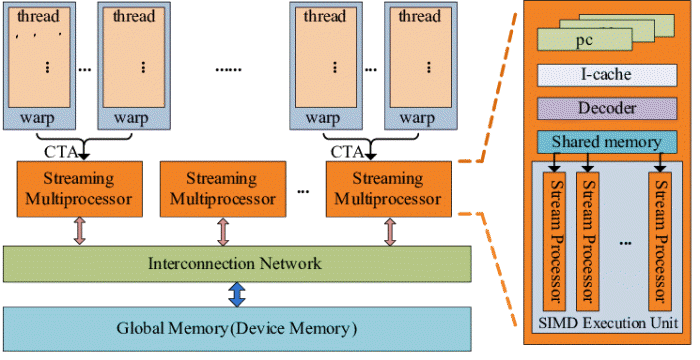
GPGPU stands for General-Purpose computing on Graphics Processing Units.
In simple terms, it is the practice of using a computer’s graphics card (GPU)—which was originally designed solely for rendering images and video games—to perform complex mathematical and scientific calculations typically handled by the computer’s main processor (CPU).
1. Why use a GPU for general tasks?
To understand GPGPU, you have to understand the architectural difference between a CPU and a GPU:
- The CPU (The “Professor”): Designed for low-latency, serial processing. It has a few powerful cores optimized to handle sequential instructions (like running an operating system or a web browser) very quickly.
- The GPU (The “Army of Workers”): Designed for high-throughput, parallel processing. It consists of thousands of smaller, simpler cores that work best when doing the same calculation on thousands of different data points simultaneously (e.g., changing the color of millions of pixels on a screen at once).
The GPGPU advantage: If a problem can be broken down into many small, independent parts, the GPU can solve it exponentially faster than a CPU.
2. How it works
In a GPGPU workflow, the CPU acts as the “manager.” It sends the data and the specific mathematical instructions to the GPU. The GPU processes this data in parallel and sends the results back to the CPU.
3. Key Frameworks
You don’t write code for a GPU the same way you do for a CPU. Developers use specific platforms to talk to the hardware:
- CUDA (Compute Unified Device Architecture): Developed by NVIDIA. It is the most popular, mature, and powerful platform, but it only works on NVIDIA GPUs.
- OpenCL (Open Computing Language): An open-standard framework that works on almost any hardware (AMD, Intel, NVIDIA, and even FPGAs). It is more flexible but historically harder to optimize than CUDA.
- ROCm: AMD’s open-source answer to CUDA.
- DirectCompute/Metal/Vulkan: Graphics APIs that also include pathways for general-purpose compute.
4. Real-World Applications
GPGPU has revolutionized several industries:
- Artificial Intelligence & Machine Learning: This is the biggest driver of GPGPU today. Training large neural networks (like ChatGPT) involves billions of matrix multiplications, which GPUs are perfectly suited for.
- Scientific Simulation: Weather forecasting, molecular modeling (drug discovery), and fluid dynamics require massive parallel calculations.
- Cryptocurrency Mining: Proof-of-Work algorithms involve repeatedly guessing numbers (hashing), which can be parallelized massively on a GPU.
- Video Encoding/Transcoding: Turning raw video files into compressed formats like H.264 or HEVC is a highly parallel task that GPUs handle much faster than CPUs.
- Financial Modeling: Banks use GPGPU for risk analysis and “Monte Carlo” simulations to predict market movements.
5. Limitations
GPGPU is not a “magic bullet.” It has specific drawbacks:
- Data Transfer Bottleneck: Moving data between the CPU (RAM) and the GPU (VRAM) over the PCIe bus is relatively slow. If the task is small, the time spent moving the data might be longer than the time spent calculating it.
- Complexity: Parallel programming is significantly more difficult than sequential programming. Developers must manage memory manually and handle complex synchronization issues.
- Not for everything: If a task depends on the previous result (a “serial” task), the GPU will actually be slower than a CPU because its individual cores are not very powerful.
Summary
If a task is “embarrassingly parallel” (meaning you can split it into thousands of tiny, independent pieces), a GPU is the best tool for the job. GPGPU is essentially the reason we are currently living through an AI boom; without the ability to use GPUs for general math, training modern AI models would take decades instead of weeks.