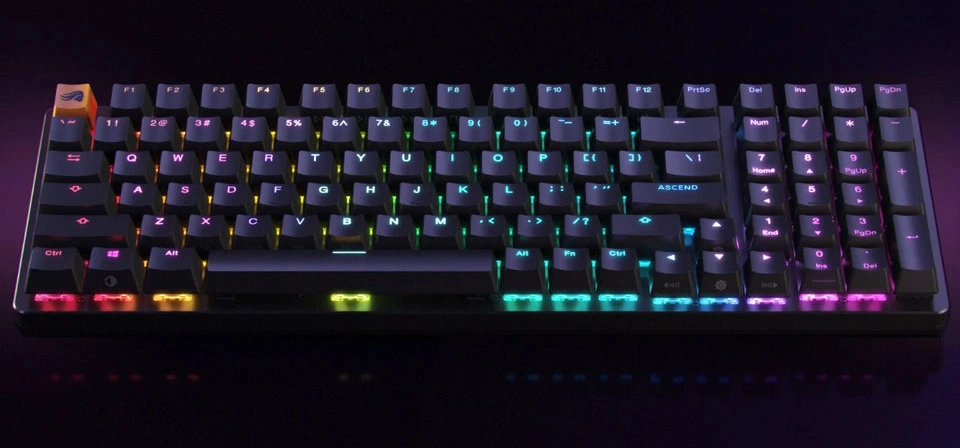
The “best” mechanical keyboard is highly subjective and depends entirely on your needs, budget, and preferences. However, I can recommend some top-tier options across various categories, along with what to consider when making your choice.
Key Factors to Consider Before Buying:
- Size/Layout:
- Full-size (100%): Includes a numpad and all function keys. Good for data entry.
- Tenkeyless (TKL) (80%): No numpad, but keeps function row and arrow keys. A good balance.
- 75%: More compact than TKL, often with keys closer together, sometimes sacrificing dedicated function row spacing.
- 65%: No function row, no numpad, but retains arrow keys. Very popular.
- 60%: No function row, no numpad, no arrow keys. Extremely compact, relies heavily on layers.
- Smaller (e.g., 40%): For highly specialized users, very compact.
- Switch Type: This is the heart of the experience!
- Linear: Smooth, consistent keystroke without a tactile bump or audible click (e.g., Cherry MX Red, Gateron Yellow, Kailh Box Red). Good for gaming and fast typing.
- Tactile: A noticeable “bump” partway through the keystroke indicates actuation (e.g., Cherry MX Brown, Gateron Brown, Holy Panda, Glorious Panda). Good for typing, helps prevent accidental presses.
- Clicky: Tactile bump with an audible “click” sound (e.g., Cherry MX Blue, Gateron Blue, Kailh Box White). Satisfying for some, but can be loud for others.
- Hot-swappable: Allows you to change switches without soldering, offering immense customization. Highly recommended for beginners.
- Connectivity:
- Wired: Most reliable, no latency, no battery life concerns.
- Wireless (Bluetooth/2.4GHz): Offers freedom from cables. 2.4GHz dongles usually offer lower latency than Bluetooth. Many keyboards offer both wired and wireless.
- Build Quality/Materials:
- Case: Plastic (lighter, cheaper) vs. Aluminum (heavier, more premium feel, better acoustics).
- Keycaps: PBT (more durable, less prone to shine) vs. ABS (common, can develop shine over time).
- Stabilizers: Good stabilizers make larger keys (spacebar, shift, enter) feel smooth and wobble-free.
- Software/Customization:
- RGB lighting, key remapping, macros. Some keyboards use proprietary software (Razer Synapse, Corsair iCUE), others use open-source (QMK/VIA).
- Budget: Mechanical keyboards range from $50 to $500+.
Top Recommended Mechanical Keyboards (By Category):
1. Best All-Around / General Use (Great Starting Point)
- Keychron K / V / Q Series (e.g., K2/K8/K Pro, V1/V2, Q1/Q2/Q5 Pro)
- Why: Keychron offers incredible value across a wide range of sizes and features. They are known for their solid build, great typing feel, Mac/Windows compatibility, and often come with hot-swappable switches. The Q series offers premium aluminum gasket mount designs, while the V series offers wired plastic gasket mount, and the K series is their wireless lineup.
- Key Features: Hot-swappable, Mac/Windows toggle, Bluetooth/2.4GHz/Wired options, RGB, QMK/VIA support (on V and Q series), premium keycaps.
- Good for: Anyone looking for a high-quality, customizable, and versatile keyboard without breaking the bank.
- Glorious GMMK 2 / GMMK Pro
- Why: Glorious basically popularized “entry-level enthusiast” keyboards. The GMMK 2 is a fantastic pre-built option, while the GMMK Pro is a barebones kit (you buy switches and keycaps separately) that offers a premium gasket-mounted aluminum experience for a relatively low price.
- Key Features: Hot-swappable, per-key RGB, robust software, excellent build quality (especially GMMK Pro), customizability.
- Good for: Users who want to easily experiment with different switches or get into custom keyboard building without complex soldering.
2. Best for Gaming
- SteelSeries Apex Pro (TKL / Mini)
- Why: Features OmniPoint adjustable mechanical switches, allowing you to customize the actuation point (how far you press for a key to register) for each key. This is a game-changer for competitive gaming.
- Key Features: Adjustable actuation, rapid trigger, per-key RGB, OLED smart display (on some models), premium build.
- Good for: Competitive gamers who need ultimate speed and precision.
- Corsair K70 RGB Pro / K100 RGB
- Why: Corsair keyboards are workhorses for gaming, known for their robust software (iCUE), high polling rates, and dedicated media controls. Available with various Cherry MX switches.
- Key Features: High polling rate (up to 8000Hz), dedicated media keys, volume roller, RGB, full-size or TKL, comfortable wrist rest.
- Good for: Gamers who want a feature-rich keyboard with reliable performance and a comprehensive software ecosystem.
- Razer Huntsman V3 Pro / BlackWidow V4 Pro
- Why: Razer’s optical switches or new analog optical switches offer incredibly fast response times. The Huntsman V3 Pro has similar adjustable actuation to the Apex Pro. Their ecosystem is huge for gamers.
- Key Features: Fast switches (optical/analog optical), adjustable actuation (Huntsman V3 Pro), dedicated macro keys (BlackWidow V4 Pro), RGB, wrist rest.
- Good for: Razer fans and gamers looking for ultra-fast performance and advanced customization within the Razer ecosystem.
3. Best for Productivity / Typing
- Leopold FC Series (e.g., FC750R / FC900R)
- Why: Often considered the gold standard for pure typing experience. No RGB, no fancy software, just incredibly solid build quality, excellent PBT keycaps, and finely tuned stabilizers.
- Key Features: Exceptional build quality, thick PBT keycaps, sound-dampening pad, various Cherry MX switches.
- Good for: Typists and professionals who value a refined, understated, and durable typing experience above all else.
- Varmilo MA Series (e.g., MA87M / MA108M)
- Why: Similar to Leopold in quality, Varmilo stands out with its stunning themed aesthetics, beautiful keycap designs, and smooth typing feel.
- Key Features: Gorgeous themed designs, high-quality PBT dye-sub keycaps, smooth proprietary switches (or Cherry MX), solid build.
- Good for: Users who want a premium typing experience with unique and beautiful aesthetics.
- Logitech MX Mechanical (Full-size / Mini)
- Why: If you’re integrated into the Logitech ecosystem (MX Master mouse, etc.) and prefer a low-profile typing experience, this is excellent. It offers great wireless connectivity and a comfortable typing feel for a low-profile board.
- Key Features: Low-profile mechanical switches (tactile, linear, clicky), multi-device wireless (Bluetooth/Logi Bolt), smart backlighting.
- Good for: Users who prefer low-profile keys, need excellent multi-device wireless connectivity, and are part of the Logitech ecosystem.
4. Best Budget-Friendly / Entry-Level
- Royal Kludge RK61 / RK68 / RK84
- Why: Offers an amazing bang for your buck. These are incredibly popular for their wireless connectivity, hot-swappable switches, and compact layouts, all at a very affordable price.
- Key Features: Hot-swappable, multi-mode wireless (Bluetooth/2.4GHz/Wired), RGB, various sizes.
- Good for: Beginners or budget-conscious users who want to try a mechanical keyboard with hot-swappable switches and wireless connectivity.
- Akko 3068B / 5075S / MOD Series
- Why: Akko offers fantastic designs, good quality proprietary switches, and hot-swappable PCBs at very competitive prices. Their aesthetic options are also vibrant and diverse.
- Key Features: Hot-swappable, often multi-mode wireless, various unique layouts, high-quality PBT keycaps, great stock switches.
- Good for: Those seeking a stylish, good-performing, and affordable mechanical keyboard with plenty of features.
- Epomaker TH66 / TH80 / RT100
- Why: Epomaker offers a wide range of budget-friendly hot-swappable keyboards, often with unique layouts (like the knob on the TH66/TH80) and decent build quality for the price. The RT100 even has a retro screen!
- Key Features: Hot-swappable, wireless options, interesting layouts, good value.
- Good for: Budget-conscious users who want specific features like a knob or a unique layout.
5. Best Premium / Enthusiast (Pre-built or Barebones)
- Keychron Q Series (e.g., Q1 Pro, Q2 Pro, Q5 Pro)
- Why: If you want an aluminum, gasket-mounted, hot-swappable keyboard with QMK/VIA support without diving into a full custom build, the Keychron Q series is the answer. Exceptional typing feel and sound.
- Key Features: Full aluminum case, gasket mount, hot-swappable, QMK/VIA support, south-facing RGB, premium sound.
- Good for: Users looking for a premium typing experience, deep customization, and an elegant aesthetic.
- MonsGeek M1 / M3
- Why: MonsGeek, a sub-brand of Akko, offers incredibly high-value aluminum, gasket-mounted barebones kits. They compete directly with the Keychron Q series but often at a lower price point.
- Key Features: Aluminum case, gasket mount, hot-swappable, QMK/VIA support, great acoustics, often come with stabilizers.
- Good for: Enthusiasts on a budget who want a top-tier barebones keyboard to build exactly how they like.
Recommendation for a First-Time Buyer
Start with a Keychron K Pro series (for wireless) or V series (for wired budget) in a TKL (80%) or 75% layout with hot-swappable Gateron Brown or Yellow switches. This gives you a fantastic balance of features, customization, and quality without overwhelming you.
Ultimately, trying out different switch types (if possible at a local store) is highly recommended before making a final decision. Happy typing!