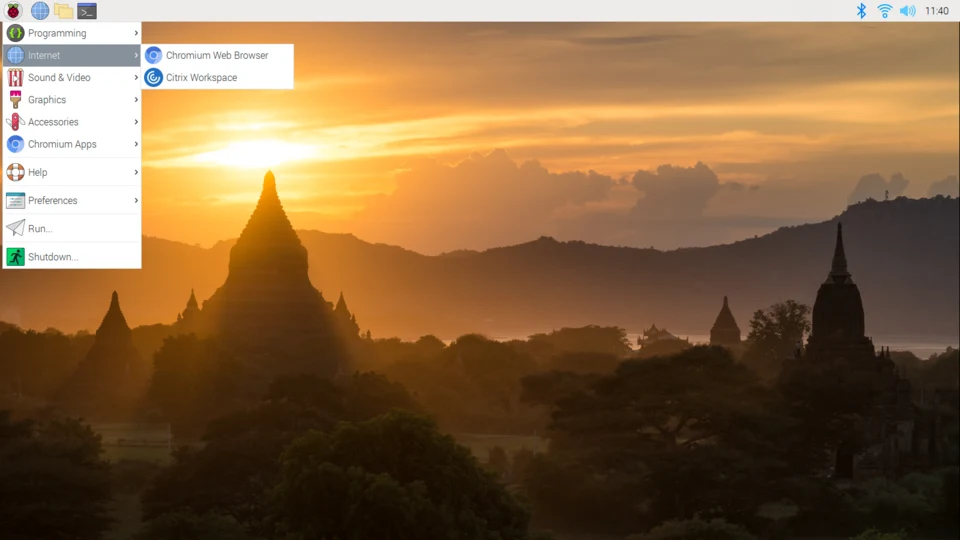
Raspberry Pi OS (formerly Raspbian) is the officially supported operating system for the Raspberry Pi family of single-board computers. It’s a hugely popular choice, and for good reason! Here’s a breakdown covering everything from its history and features to its different versions and how to get started:
1. History & Development
- Origins: Initially, there wasn’t a single “official” OS. People used various Linux distributions.
- Raspbian’s Rise: Raspbian was created by Mike Thompson in 2012, based on Debian. It quickly became the most popular choice due to its optimization for the Raspberry Pi’s ARM architecture.
- Official Adoption: In 2019, the Raspberry Pi Foundation took over direct development of Raspbian and rebranded it as Raspberry Pi OS. This signified a closer integration and commitment to providing a tailored experience.
- Ongoing Development: The Raspberry Pi Foundation continues to actively develop and improve Raspberry Pi OS, releasing regular updates and new features.
2. Key Features & Benefits
- Debian-Based: Being based on Debian, it benefits from a massive software repository and a stable foundation. You have access to thousands of packages through the
aptpackage manager. - Optimized for Raspberry Pi: Specifically tuned for the ARM processors used in Raspberry Pi boards, resulting in better performance and efficiency.
- Beginner-Friendly: Designed with ease of use in mind, especially for newcomers to Linux and computing. It includes a graphical user interface (GUI) and pre-installed software.
- Free and Open Source: Raspberry Pi OS is completely free to use and modify, fostering a vibrant community and encouraging innovation.
- Wide Software Support: Compatible with a vast range of software, including programming languages (Python, C++, Java, etc.), office suites, web browsers, and more.
- Hardware Support: Excellent support for Raspberry Pi hardware, including GPIO pins, camera module, and other peripherals.
- Regular Updates: Benefits from regular security and software updates, keeping your system secure and up-to-date.
- Large Community: A huge and active community provides ample support, tutorials, and resources.
3. Different Versions of Raspberry Pi OS
There are several versions of Raspberry Pi OS available, catering to different needs:
- Raspberry Pi OS (with desktop): The full version, including a graphical desktop environment (LXDE). This is the most common choice for general-purpose use, learning, and projects requiring a GUI. It’s the largest download.
- Raspberry Pi OS Lite: A minimal version without a graphical desktop. It’s ideal for headless setups (no monitor, keyboard, or mouse) where you’ll access the Pi remotely via SSH. It’s smaller and uses fewer resources, making it suitable for servers, IoT projects, and embedded applications.
- Raspberry Pi OS (64-bit): A 64-bit version of the OS. While the standard version is 32-bit, the 64-bit version can offer performance improvements for certain applications, especially those that benefit from larger memory addressing. It’s becoming increasingly popular, especially on Raspberry Pi 4 and 5.
- Raspberry Pi OS (Legacy): Older versions of the OS, useful for compatibility with older projects or software. Generally, it’s recommended to use the latest version unless you have a specific reason not to.
- Raspberry Pi OS (Full): Includes a wider range of pre-installed software than the standard “with desktop” version. It’s a larger download and may include software you don’t need.
4. Getting Started
- Download: Download the desired version of Raspberry Pi OS from the official website: https://www.raspberrypi.com/software/
- Imager Tool: Use the Raspberry Pi Imager tool (also available on the website) to write the OS image to a microSD card. This tool simplifies the process and automatically formats the card.
- Insert & Boot: Insert the microSD card into your Raspberry Pi and power it on.
- Initial Setup: Follow the on-screen instructions to configure your Raspberry Pi, including setting the language, keyboard layout, Wi-Fi connection, and password.
- Update: After the initial setup, it’s crucial to update the system:
    sudo apt update
    sudo apt full-upgrade
5. Key Software & Tools
- LXDE: The default desktop environment (in the “with desktop” version). Lightweight and efficient.
- Thonny: A beginner-friendly Python IDE pre-installed.
- Scratch: A visual programming language for kids and beginners.
- Chromium: A web browser.
- Terminal: The command-line interface for interacting with the OS.
- VNC Viewer: For remote access to the desktop (if needed).
- SSH: For secure remote access via the command line (especially useful for Raspberry Pi OS Lite).
aptPackage Manager: The primary tool for installing, updating, and removing software.
6. Resources & Community
- Official Raspberry Pi Website: https://www.raspberrypi.com/
- Raspberry Pi Documentation: https://www.raspberrypi.com/documentation/
- Raspberry Pi Forums: https://forums.raspberrypi.com/
- Raspberry Pi Stack Exchange: https://raspberrypi.stackexchange.com/
- Numerous Tutorials & Projects: A wealth of online resources are available on YouTube, blogs, and other websites.
In conclusion
Raspberry Pi OS is a powerful, versatile, and accessible operating system that makes the Raspberry Pi an incredibly useful platform for a wide range of projects. Whether you’re a beginner learning to code or an experienced developer building complex applications, Raspberry Pi OS provides a solid foundation for your endeavors. Its active community and continuous development ensure it remains a leading choice for Raspberry Pi users worldwide.