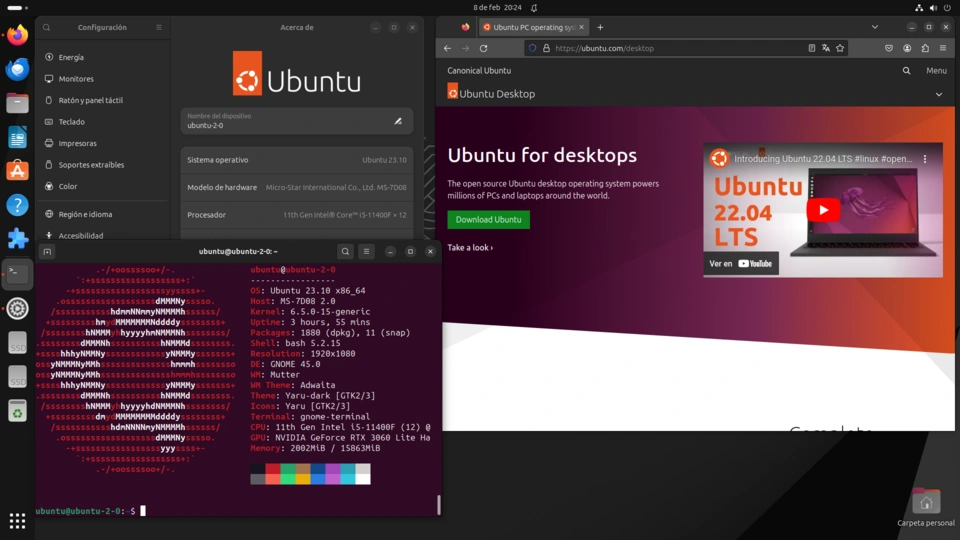
Ubuntu is one of the most popular Linux distributions, known for its user-friendliness, stability, and strong community support. Here’s a detailed look, covering its history, features, versions, uses, and more:
1. What is Ubuntu?
- Linux Distribution: Ubuntu isn’t an operating system in itself, but rather a distribution of the Linux kernel. It bundles the kernel with other software like desktop environments, applications, and system tools to create a complete and usable OS.
- Based on Debian: Ubuntu is based on Debian, another well-respected Linux distribution. It inherits Debian’s stability and vast software repository but aims for a more frequent release cycle and a more polished user experience.
- Open Source: Ubuntu is entirely open-source, meaning its source code is freely available for anyone to view, modify, and distribute. This fosters collaboration and innovation.
- Developed by Canonical: Ubuntu is primarily developed and maintained by Canonical Ltd., a UK-based company founded by Mark Shuttleworth. However, a huge community of volunteers also contribute significantly.
2. History & Philosophy
- Launched in 2004: Mark Shuttleworth launched Ubuntu with the goal of bringing a user-friendly Linux experience to the masses.
- “Ubuntu” Meaning: The name “Ubuntu” comes from the Nguni Bantu term meaning “humanity towards others.” This philosophy is reflected in the distribution’s commitment to being accessible, inclusive, and free.
- Early Goals: Early Ubuntu focused on ease of installation, a regular release schedule, and providing a complete desktop experience out of the box.
- Rapid Growth: Ubuntu quickly gained popularity, becoming one of the leading Linux distributions for both desktop and server use.
3. Key Features
- User-Friendly: Ubuntu is designed to be easy to use, even for people new to Linux. It features a graphical user interface (GUI) that’s intuitive and familiar.
- Regular Releases: Ubuntu follows a predictable release schedule:
- Standard Releases (every 6 months): These releases include the latest features and software updates. They are supported for 9 months.
- Long Term Support (LTS) Releases (every 2 years): LTS releases are designed for stability and are supported for 5 years (and often longer with extended support options). They are ideal for production environments.
- Large Software Repository: Ubuntu has access to a massive software repository containing tens of thousands of applications. You can easily install software using the Ubuntu Software Center or the command line.
- Security: Linux, and therefore Ubuntu, is generally considered very secure. Regular security updates are provided to protect against vulnerabilities.
- Customization: Ubuntu is highly customizable. You can choose from different desktop environments, themes, and applications to tailor the system to your preferences.
- Community Support: Ubuntu has a large and active community of users and developers who provide support through forums, wikis, and other channels.
- Free of Charge: Ubuntu is completely free to download, use, and distribute.
4. Desktop Environments
Ubuntu offers several different desktop environments, each with its own look and feel:
- GNOME (Default): The standard desktop environment for Ubuntu. It’s modern, polished, and focuses on simplicity and ease of use.
- KDE Plasma: A highly customizable and feature-rich desktop environment.
- XFCE: A lightweight desktop environment that’s ideal for older hardware or systems with limited resources.
- MATE: A traditional desktop environment that’s based on GNOME 2.
- LXQt: Another lightweight desktop environment, even more minimal than XFCE.
5. Ubuntu Flavors (Official Variants)
These are official versions of Ubuntu that use different desktop environments:
- Kubuntu: Uses KDE Plasma.
- Xubuntu: Uses XFCE.
- Lubuntu: Uses LXQt.
- Ubuntu MATE: Uses MATE.
- Ubuntu Budgie: Uses the Budgie desktop environment.
- Ubuntu Studio: Designed for creative professionals (audio, video, graphics).
- Ubuntu Kylin: Designed for Chinese users.
6. Uses of Ubuntu
Ubuntu is versatile and can be used for a wide range of purposes:
- Desktop Computing: Everyday tasks like browsing the web, writing documents, watching videos, and playing games.
- Server: Running web servers, databases, and other server applications. Ubuntu Server is a popular choice for cloud computing and DevOps.
- Cloud Computing: Ubuntu is widely used in cloud environments like Amazon Web Services (AWS), Microsoft Azure, and Google Cloud Platform.
- Development: A great platform for software development, with support for various programming languages and tools.
- Internet of Things (IoT): Ubuntu Core is a minimal version of Ubuntu designed for embedded systems and IoT devices.
- Education: Used in schools and universities for teaching and learning.
- Scientific Computing: Used in research and scientific applications.
7. Getting Ubuntu
- Download: You can download Ubuntu from the official website: https://ubuntu.com/download
- Installation: Ubuntu can be installed in several ways:
- Dual Boot: Install Ubuntu alongside your existing operating system (e.g., Windows).
- Virtual Machine: Run Ubuntu inside a virtual machine (e.g., VirtualBox, VMware).
- Live USB/DVD: Run Ubuntu directly from a USB drive or DVD without installing it.
- WSL (Windows Subsystem for Linux): Run Ubuntu directly within Windows 10 and 11.
8. Resources for Learning More
- Official Ubuntu Website: https://ubuntu.com/
- Ubuntu Documentation: https://ubuntu.com/tutorials
- Ubuntu Forums: https://discourse.ubuntu.com/
- Ask Ubuntu (Stack Exchange): https://askubuntu.com/
- Ubuntu Wiki: https://wiki.ubuntu.com/
In conclusion, Ubuntu is a powerful, versatile, and user-friendly operating system that’s a great choice for both beginners and experienced users alike. Its open-source nature, strong community support, and regular updates make it a reliable and secure platform for a wide range of applications.
Is there anything specific about Ubuntu you’d like to know more about? For example, are you interested in:
- Installing Ubuntu?
- Using the command line?
- Specific applications available for Ubuntu?
- Comparing Ubuntu to other Linux distributions?
- Ubuntu Server?