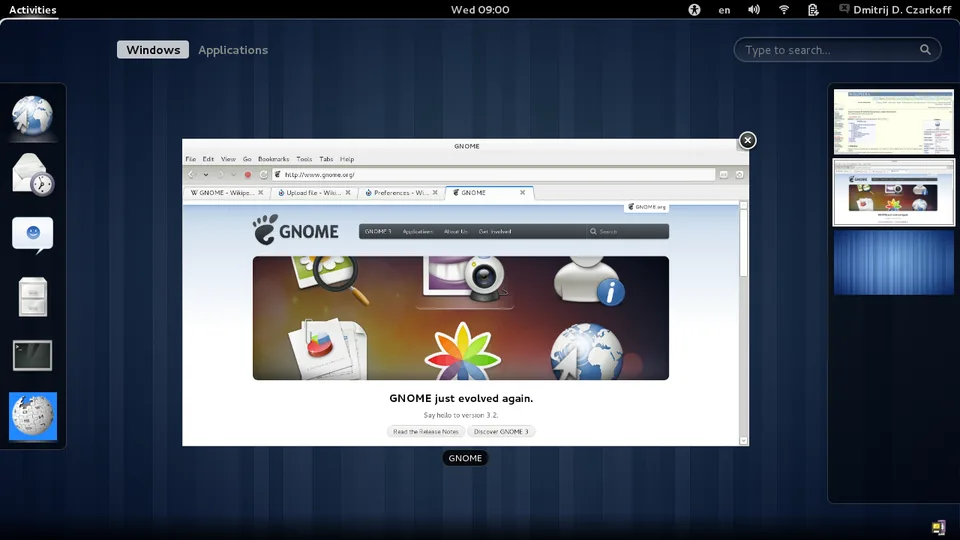
GNOME (GNU Network Object Model Environment) is a hugely popular and influential desktop environment for Linux and other Unix-like operating systems. It’s known for its focus on simplicity, usability, and modern design. Here’s a comprehensive overview, covering its history, features, philosophy, and current state:
1. History & Origins
- Early Days (1997-1999): GNOME began as a free software project initiated by Miguel de Icaza, aiming to create a fully functional desktop environment independent of proprietary software like Windows. It was a response to the lack of a compelling free desktop option.
- GNOME 2 (2001-2011): This era was characterized by a traditional desktop metaphor – a panel at the top or bottom, application menus, and a desktop for icons. It became incredibly popular and stable, forming the basis for many Linux distributions’ default desktop.
- GNOME 3 (2011-Present): A significant overhaul. GNOME 3 introduced a new shell with a focus on activities, a dynamic overview, and a more streamlined user experience. This change was controversial initially, as it deviated significantly from the familiar GNOME 2. It’s been continuously refined and improved since.
- GNOME 40+ (2020-Present): Further refinements focusing on a cleaner, more modern look, improved workflow, and better integration with Wayland (a modern display server protocol). GNOME 42, 43, 44, and 45 have continued this trend with incremental but impactful improvements. GNOME 46 (released March 22, 2024) focuses on performance and usability.
2. Key Features & Components
- GNOME Shell: The core of the GNOME experience. It provides the user interface, including the top bar, activities overview, application launcher, and system tray.
- Mutter: The window manager responsible for drawing and managing windows. It’s designed to be flexible and supports both X11 and Wayland.
- GNOME Core Applications: A suite of essential applications developed as part of the GNOME project, designed to work seamlessly together. These include:
- Files (Nautilus): The file manager.
- Web (Epiphany): The web browser.
- Text Editor (Gedit): A simple and powerful text editor.
- Terminal (GNOME Terminal): A terminal emulator.
- Settings: The system settings application.
- Calendar: A calendar and scheduling application.
- Photos: An image viewer and organizer.
- Videos: A video player.
- Music: A music player.
- GTK (GIMP Toolkit): The widget toolkit used to build GNOME applications. It provides the building blocks for creating graphical user interfaces. GTK4 is the current version, offering improved performance and features.
- GNOME Display Manager (GDM): The login screen.
- Wayland Support: GNOME is a leading adopter of Wayland, a modern display server protocol that aims to replace X11. Wayland offers improved security, performance, and modern features.
- Accessibility: GNOME has strong accessibility features, including screen readers, on-screen keyboards, and high contrast themes.
- Internationalization & Localization: GNOME supports a wide range of languages and locales.
3. Design Philosophy
- Human-Centered Design: GNOME prioritizes the user experience. Design decisions are based on understanding how people actually use computers.
- Simplicity & Elegance: The goal is to create a clean, uncluttered interface that is easy to learn and use. GNOME avoids unnecessary complexity.
- Consistency: GNOME applications strive for a consistent look and feel, making it easier for users to switch between them.
- Free Software: GNOME is committed to free and open-source software principles.
- Modernity: GNOME embraces modern technologies and design trends.
4. Current State (as of April 2025)
- GNOME 48 is the latest stable release. It focuses on performance improvements, usability enhancements, and refinements to existing features.
- Continued Wayland Adoption: Wayland is becoming the default display server in many distributions using GNOME.
- GTK4 is maturing: More and more applications are being ported to GTK4, taking advantage of its new features and performance improvements.
- Ongoing Development: The GNOME project is actively developed by a large community of contributors. New features and improvements are constantly being added.
- Popularity: GNOME remains one of the most popular desktop environments for Linux, used by distributions like Fedora, Ubuntu (default in some flavors), Debian, and many others.
5. Pros & Cons
Pros
- User-Friendly: Generally considered easy to learn and use, especially for newcomers to Linux.
- Modern & Attractive: Visually appealing and well-designed.
- Strong Community: Large and active community providing support and contributing to development.
- Excellent Accessibility: Robust accessibility features.
- Good Performance: Continually improving performance, especially with Wayland.
- Well-Integrated Applications: GNOME Core Applications work seamlessly together.
Cons
- Customization Limitations: Compared to some other desktop environments (like KDE Plasma), GNOME offers less customization options. This is a deliberate design choice to maintain simplicity and consistency.
- Resource Usage: Can be more resource-intensive than some lighter-weight desktop environments, although improvements are being made.
- Initial GNOME 3 Transition: The shift to GNOME 3 was controversial for some users accustomed to GNOME 2.
6. Where to Learn More
- Official GNOME Website: https://www.gnome.org/
- GNOME Wiki: https://wiki.gnome.org/
- GNOME GitLab: https://gitlab.gnome.org/ (Source code and development)
- Distro-Specific Documentation: Check the documentation for your Linux distribution for information on using GNOME.
In conclusion, GNOME is a powerful and well-respected desktop environment that continues to evolve and improve. Its focus on simplicity, usability, and modern design makes it a popular choice for both new and experienced Linux users. It’s a cornerstone of the free and open-source desktop landscape.