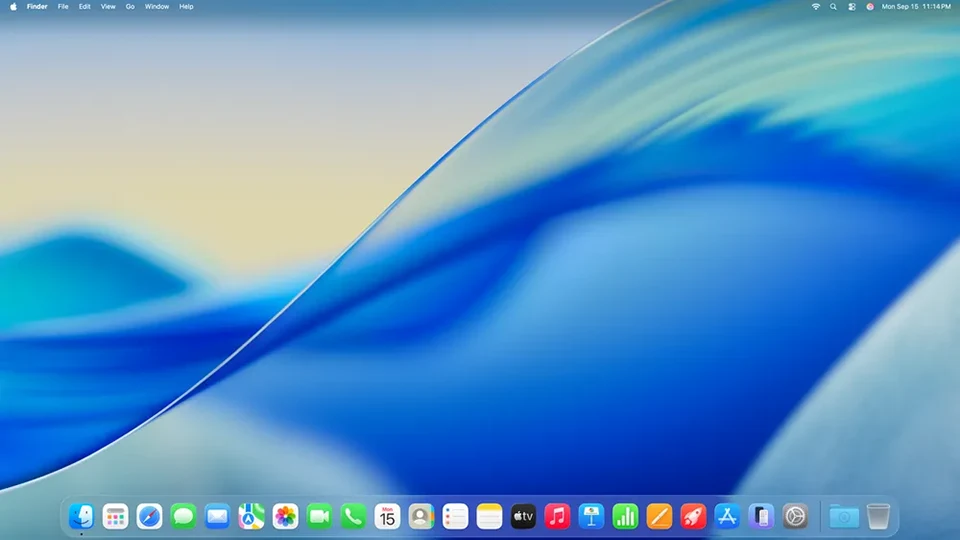
macOS (formerly OS X) is the operating system that powers Apple’s Mac computers. It’s known for its user-friendly interface, stability, security, and integration with Apple’s ecosystem of devices and services. Here’s a detailed look, covering its history, features, versions, advantages, disadvantages, and more:
1. History & Evolution
- Early Days (1984-1997): Apple’s original Macintosh operating system was groundbreaking for its graphical user interface (GUI). However, it faced limitations and struggled to compete with Windows.
- NeXTSTEP (1987-1996): Apple acquired NeXT in 1997, bringing with it NeXTSTEP, a powerful and advanced operating system. This was the foundation for the modern macOS.
- OS X (2001): The first version of OS X (Cheetah) was released, based on NeXTSTEP. It introduced a completely new, Unix-based core.
- OS X to macOS (2012-Present): Apple dropped the “OS X” name and began naming releases after California landmarks (Mavericks, Yosemite, El Capitan, etc.). This signaled a shift towards a more consistent and modern operating system. The current version is macOS Tahoe (26), released in September 2025.
2. Key Features
- User Interface (Aqua): macOS is renowned for its visually appealing and intuitive interface. Features include:
- Dock: A customizable bar for quick access to frequently used applications.
- Menu Bar: Located at the top of the screen, providing access to application menus and system controls.
- Finder: The file manager for navigating and organizing files.
- Spotlight: A powerful search tool for finding files, applications, and information on your Mac and the web.
- Mission Control: Provides an overview of all open windows and spaces.
- Unix-Based: Built on a robust Unix core, macOS offers stability, security, and powerful command-line tools.
- Integration with Apple Ecosystem: Seamlessly works with other Apple devices (iPhones, iPads, Apple Watches) through features like:
- Handoff: Start a task on one device and continue it on another.
- AirDrop: Wirelessly share files between Apple devices.
- iCloud: Cloud storage and synchronization for data across devices.
- Continuity Camera: Use your iPhone as a webcam for your Mac.
- Security: macOS has a strong security reputation, with features like:
- Gatekeeper: Helps protect against malware by verifying downloaded applications.
- FileVault: Full-disk encryption to protect your data.
- XProtect: Built-in anti-malware technology.
- Applications: Comes pre-installed with a suite of powerful applications:
- Safari: Web browser
- Mail: Email client
- Photos: Photo management and editing
- iMovie: Video editing
- GarageBand: Music creation
- Pages, Numbers, Keynote: Productivity suite (word processing, spreadsheets, presentations)
- Accessibility: macOS offers a wide range of accessibility features for users with disabilities.
- Virtualization: Supports virtualization software like Parallels Desktop and VMware Fusion, allowing you to run other operating systems (like Windows) on your Mac.
3. Recent macOS Versions (Highlights)
- Monterey (12): Introduced Universal Control (use a single mouse and keyboard across multiple Macs and iPads), improved FaceTime, and Safari redesign.
- Ventura (13): Stage Manager (a new way to organize windows), improved Spotlight, and Mail app updates.
- Sonoma (14): Widgets on the desktop, enhanced video conferencing features, and a revamped Safari experience.
- Sequoia (15): There are improvements in several areas, including productivity.
- Tahoe (26): This version changes the version number to match the year and has several improved features.
4. Advantages of macOS
- User-Friendly: Intuitive interface makes it easy to learn and use.
- Stability: Generally very stable and reliable.
- Security: Strong security features protect against malware and data breaches.
- Performance: Optimized for Apple hardware, delivering excellent performance.
- Ecosystem Integration: Seamlessly integrates with other Apple devices and services.
- Creative Applications: Excellent support for creative professionals with applications like Final Cut Pro and Logic Pro.
- Unix Underpinnings: Provides a powerful foundation for developers and advanced users.
- Regular Updates: Apple provides regular software updates with new features and security improvements.
5. Disadvantages of macOS
- Hardware Cost: Macs are generally more expensive than comparable Windows PCs.
- Limited Hardware Choices: You’re limited to Apple’s hardware configurations.
- Gaming: While improving, macOS has a smaller selection of games compared to Windows.
- Software Compatibility: Some Windows-specific software may not be available for macOS (though virtualization can help).
- Repair Costs: Repairs can be expensive, and you often need to go through Apple or an authorized service provider.
6. macOS Compatibility
- Apple Silicon (M1, M2, M3 chips): The latest Macs use Apple’s own silicon, offering significant performance and efficiency gains. macOS is optimized for these chips.
- Intel-based Macs: Older Macs use Intel processors. macOS still supports these, but Apple is phasing them out.
7. Resources for Learning More
- Apple’s macOS Website: https://www.apple.com/macos/
- Apple Support: https://support.apple.com/mac
- MacRumors: https://www.macrumors.com/ (News and information about Apple products)
- 9to5Mac: https://9to5mac.com/ (Another source for Apple news)
In conclusion, macOS is a powerful and well-designed operating system that offers a compelling user experience, especially for those already invested in the Apple ecosystem. While it has some drawbacks, its strengths in usability, security, and integration make it a popular choice for a wide range of users.
Do you have any specific questions about macOS that you’d like me to answer? For example, are you interested in:
- A comparison between macOS and Windows?
- Specific features of a particular macOS version?
- Troubleshooting a macOS issue?
- Learning about macOS command-line tools?