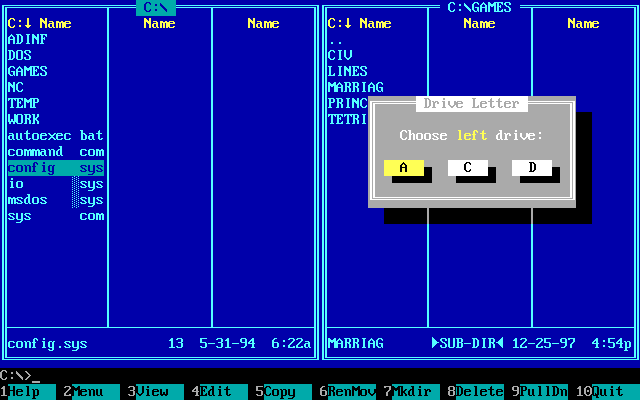
Norton Commander was a hugely influential DOS file manager, released in 1986 by Symantec. It wasn’t just a program; it was the program for many PC users in the late 80s and early 90s. Here’s a comprehensive look at its history, features, impact, and legacy:
What was Norton Commander?
At its core, Norton Commander was a text-mode file manager. Instead of relying on a graphical user interface (GUI) like Windows, it presented a dual-pane interface within the DOS environment. This meant you could see two directories simultaneously, making file operations like copying, moving, and deleting incredibly efficient.
Key Features
- Dual-Pane Interface: This is the defining feature. Having two directory listings side-by-side dramatically sped up file management. You could easily see the source and destination for file operations.
- File Operations: Beyond basic copy, move, delete, and rename, it offered:
- Directory Creation: Easily create new folders.
- File Viewing: Built-in viewers for text files, and the ability to launch external viewers for other file types.
- File Searching: Powerful search capabilities to locate files based on name, date, size, or content.
- File Attributes: Manage file attributes like hidden, system, read-only, and archive.
- Menus & Hotkeys: A comprehensive menu system accessible via function keys (F1-F10) provided quick access to all features. Extensive hotkey customization was also available, allowing power users to tailor the program to their workflow.
- Archive Handling: Excellent support for archiving and unarchiving common formats like ZIP, ARJ, and RAR (through external utilities).
- FTP Client: Built-in FTP client for transferring files to and from remote servers.
- Directory Tree: A visual directory tree allowed for easy navigation through complex folder structures.
- User-Defined Menus: You could create custom menus to launch frequently used programs or execute DOS commands.
- External Program Integration: Norton Commander was designed to work seamlessly with other DOS programs. You could easily launch applications from within the file manager.
- Norton Utilities Integration: It was often bundled with other Norton Utilities, like DiskEdit and SpeedDisk, making it a comprehensive system maintenance tool.
History & Development
- Early Days (1986): Developed by Far Manager author John Socha and later enhanced by Mark Peterson at Symantec. It quickly became a must-have for DOS users.
- Versions: Numerous versions were released, each adding new features and improvements. Key versions included:
- Norton Commander 1.0 (1986): The original.
- Norton Commander 3.0 (1988): Significant improvements to the interface and features.
- Norton Commander 4.0 (1991): Added support for long filenames (introduced with Windows 3.1).
- Norton Commander 5.5 (1994): One of the last major releases for DOS.
- Decline: With the rise of Windows 95 and its graphical file manager (Windows Explorer), Norton Commander’s popularity began to wane. Symantec eventually discontinued development.
Why was it so popular?
- Speed & Efficiency: In a DOS environment, Norton Commander was fast. It was much quicker to navigate and manage files than using DOS commands directly.
- Intuitive Interface: The dual-pane interface was incredibly intuitive and easy to learn.
- Power User Features: Hotkeys, user-defined menus, and external program integration catered to advanced users.
- Bundling with Norton Utilities: Being bundled with other essential utilities like disk defragmenters and disk editors made it a valuable package.
- DOS Dominance: During the late 80s and early 90s, DOS was the dominant operating system for PCs. Norton Commander was the best way to manage files in that environment.
Impact & Legacy
- Inspired Numerous Clones: Norton Commander’s success spawned a plethora of clones and similar file managers, both for DOS and other operating systems. Examples include:
- Volkov Commander: A popular DOS clone.
- Total Commander: A highly regarded Windows file manager that is directly inspired by Norton Commander and remains popular today.
- Midnight Commander: A cross-platform, console-based file manager for Unix-like systems.
- Double Commander: A free, open-source cross-platform file manager.
- Influenced GUI File Managers: The dual-pane interface, while not universally adopted, has influenced the design of some GUI file managers.
- Nostalgia: For many PC users who grew up with DOS, Norton Commander evokes a strong sense of nostalgia. It represents a simpler time in computing.
- Still Used Today: While not mainstream, Norton Commander (or its clones) is still used by some users for specific tasks, particularly in environments where a lightweight, efficient file manager is needed. It’s also popular among retro-computing enthusiasts.
Where to find it today
- Abandonware Sites: You can find older versions of Norton Commander on abandonware websites (be cautious about downloading from untrusted sources).
- DOS Emulators: The best way to experience Norton Commander is to run it within a DOS emulator like DOSBox.
- Total Commander (Windows): If you want a modern equivalent, Total Commander is the closest you’ll get.
In conclusion, Norton Commander was more than just a file manager; it was a cultural icon of the DOS era. Its innovative interface, powerful features, and widespread popularity left a lasting impact on the world of computing.
You can find more information at these links:
- Wikipedia: https://en.wikipedia.org/wiki/Norton_Commander
- OldVersion.com: http://www.oldversion.com/software/norton-commander.html
- Total Commander (inspired by Norton Commander): https://www.ghisler.com/
Is there anything specific about Norton Commander you’d like to know more about? Perhaps you’re interested in its hotkeys, how it compares to other file managers, or how to run it in DOSBox? Just let me know!